
TouchUp Pro - Photo Editor2.8.5 - Get APK
You'll be able to download in few seconds.
Publisher Description
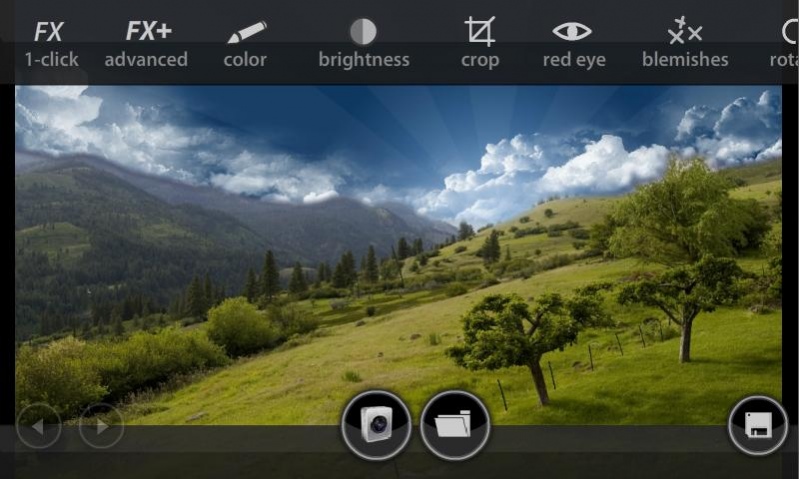
Maybe the easiest Photo Editor you'll ever use...
Quick, clean User Interface lets you edit photos in a matter of seconds. In terms of ease of use, this is hands down the best Photo Editing application on Android today!
Optimized for all screen sizes, it runs great on a handset, and feels perfect with your Tablet device.
Gone are the clunky buttons, over-designed interfaces and boring menu's. We've created a simple, lightweight interface that gets out of your way and lets you work with ease.
Simple to use, but still powerful.
Features Include:
* Load pictures from Camera or Library
* Red Eye Removal
* Pimple / Blemish Removal)
* Sharpness / Blur
* Contrast / Brightness
* Hue / Saturation
* Rotation / Flip
* Cropping
* Resize on Save
* Unlimited Undo / Redo
* Extremely stable, no freezing/crashing
TouchUp Pro has a number of "1-click" effects:
* Auto-Contrast
* Auto Brightness
* Vintage Photo
* B & W
* Vignette
* Sepia
* Red Pop
* Dark Pop
* Deep Purple
* Green Tint
* High Contrast
* Low Saturation
* High Saturation
All effects are stackable. Combine them to make a ton of different looks.
We also offer a number of "Advanced Effects" which you can fine-tune:
* Advanced Vignette
* Advanced Vintage Photo
* Advanced Sepia
* RGB Channels
[edit, photos, edit photos, edit pics, pictures, camera, sepia, redeye, red eye, crop, rotate, fx, effects, sharpen images, sharpen, picsay]
About TouchUp Pro - Photo Editor
The company that develops TouchUp Pro - Photo Editor is esDot Development Studio. The latest version released by its developer is 2.8.5.
To install TouchUp Pro - Photo Editor on your Android device, just click the green Continue To App button above to start the installation process. The app is listed on our website since 2013-01-07 and was downloaded 0 times. We have already checked if the download link is safe, however for your own protection we recommend that you scan the downloaded app with your antivirus. Your antivirus may detect the TouchUp Pro - Photo Editor as malware as malware if the download link to air.com.esdot.PhotoTouchupPro is broken.
How to install TouchUp Pro - Photo Editor on your Android device:
- Click on the Continue To App button on our website. This will redirect you to Google Play.
- Once the TouchUp Pro - Photo Editor is shown in the Google Play listing of your Android device, you can start its download and installation. Tap on the Install button located below the search bar and to the right of the app icon.
- A pop-up window with the permissions required by TouchUp Pro - Photo Editor will be shown. Click on Accept to continue the process.
- TouchUp Pro - Photo Editor will be downloaded onto your device, displaying a progress. Once the download completes, the installation will start and you'll get a notification after the installation is finished.
Program Details
System requirements
Download information
Pricing
Version History
version 2.8.5
posted on 2013-01-07
* Increased save resolution to 8MP
* Added pinch to zoom
* Improved Cropping tool
* Improved Red Eye tool
* Improved Blemish Remover tool
* Changed save format to JPG
* No need to re-mount SD card on save
version 2.8.5
posted on 2013-01-07
version 2.1.11
posted on 2011-05-18
Several fixes and updates
Disclaimer
External Download
We do not host TouchUp Pro - Photo Editor on our servers. We did not scan it for viruses, adware, spyware or other type of malware. This app is hosted by Galad and passed their terms and conditions to be listed there. We recommend caution when installing it.
The APK Download link for TouchUp Pro - Photo Editor is provided to you by apps112.com without any warranties, representations or guarantees of any kind, so access it at your own risk.
If you have questions regarding this particular app contact the publisher directly. For questions about the functionalities of apps112.com contact us.
